Click here to download the file
=================
RDBMS Programs
1) Program
to print Hello World.
SET SERVEROUTPUT ON
BEGIN
DBMS_OUTPUT.PUT_LINE('Hello World');
END;
/
Output
Hello World
PL/SQL procedure successfully completed.
2) Program
to demonstrate the use of variable.
SET serveroutput ON
DECLARE
name
varchar(40);
BEGIN
name :=
'Chirag Mewada';
DBMS_OUTPUT.PUT_LINE('Hello
' || name);
END;
/
Output
Hello Chirag Mewada
PL/SQL procedure successfully completed.
3) Program
to demonstrate the use of %TYPE.
SET
serveroutput ON
DECLARE
name Worker.FIRST_NAME%TYPE;
BEGIN
SELECT FIRST_NAME INTO name
FROM
Worker
WHERE WORKER_ID = 002;
DBMS_OUTPUT.PUT_LINE('Hello ' || name);
END;
/
Output
Hello Chirag Mewada
PL/SQL procedure successfully completed.
Here are the steps:

set ORA_USER=bert
set ORA_PASS=bert1234
set ORA_SID= ORCL
npp_save
cmd /c copy /y "$(CURRENT_DIRECTORY)\$(FILE_NAME)" "$(SYS.TEMP)\$(FILE_NAME)" >nul 2>&1
cmd /c echo. >> "$(SYS.TEMP)\$(FILE_NAME)"
cmd /c echo exit >> "$(SYS.TEMP)\$(FILE_NAME)"
sqlplus -l $(ORA_USER)/$(ORA_PASS)@$(ORA_SID) @"$(SYS.TEMP)\$(FILE_NAME)"

setup.exe, double-click it.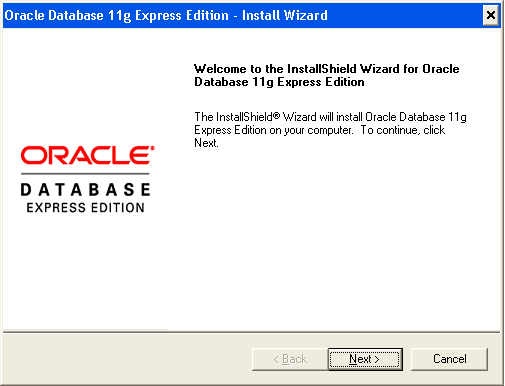
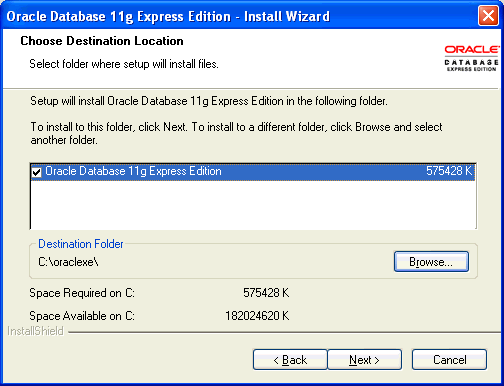
If you are prompted for a port number, then specify one.
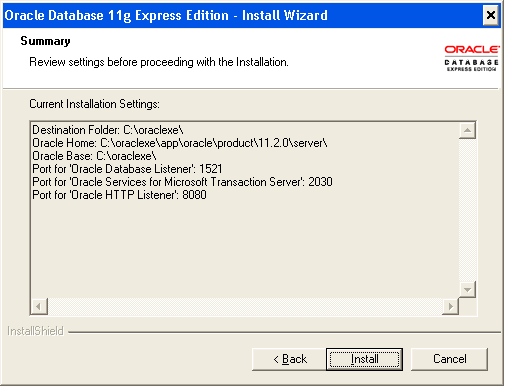
The following port numbers are the default values:
1521: Oracle database listener
2030: Oracle Services for Microsoft Transaction Server
8080: HTTP port for the Oracle Database XE graphical user interface
If these port numbers are not currently used, then the installation uses them automatically without prompting you. If they are in use, then you will be prompted to enter an available port number.
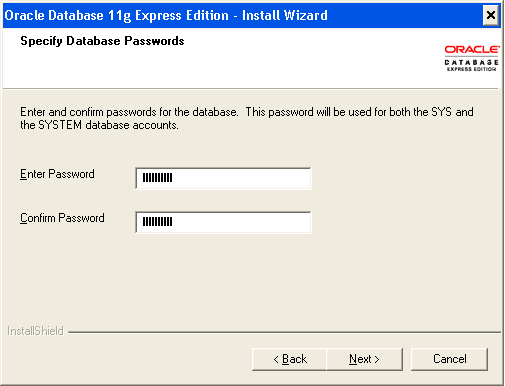
In the Specify Database Passwords window, enter and confirm the password to use for the SYS and SYSTEM database accounts. Then click Next.
In the Summary window, review the installation settings, and if you are satisfied, click Install. Otherwise, click Back and modify the settings as necessary.
Select Start, then Control Panel.
In the Control Panel, double-click Administrative Tools, and then Services.
Right-click each of the following services, and then select Properties from the menu. Then set the start-up type of the service to Automatic.
OracleXEClrAgnt (for .NET stored procedures)
OracleMTSRecoveryService (Oracle Services for Microsoft Transaction Server)
Click OK.
Start each service by right-clicking its name and selecting Start from the menu.
Click here to download the file
ASP.NET Theory Assignment 1
Write answers of following questions in detail.
All questions are grouped based on the topic.
1. Basics of ASP.NET
================
1) Developer productivity in ASP.NET.
2) Explain major features added in ASP.NET. Also explain how ASP.NET
provides more developer productivity.
3) Write a note on common language runtime.
4) Write note on .NET Framework.
5) Explain page class with its properties, events, and methods.
6) Define Code sharing model in ASP.NET. Explain code directory model in
detail.
7) Explain Page Life Cycle in detail.
8) Demonstrate the use of Application object in ASP.NET.
9) Explain MSIL.
10)What is Response Object? Explain its properties and methods.
11)Discuss significance of Post Back mechanism.
2. Validation Controls
=================
1) What is advantage of validator control? List validator controls and explain
range validator and regular expression validator in detail.
2) Explain Range Validator control.
3) Explain in detail Validation controls.
4) List out various Validation controls and explain any two in detail.
5) Explain Custom Validation control.
3. Navigation Controls
=================
1) Discuss navigation controls.
2) Explain Menu Control.
3) Explain SiteMapPath control.
4. Master Page
============
1) What are advantages of master page over CSS? Explain nested master
page in detail.
2) What is Master Page? Why we need it? Explain briefly about nested
master page.
3) Write note on Master Page.
4) What is Master Page? Explain it in detail along with the Content Page.
5. Theme & CSS
=============
1) Write detailed note on Theme.
2) Explain Theme and CSS.
3) Explain Theme in detail.
6. Login Controls
==============
1) Explain Login Control, LoginName and LoginStatus with its properties.
2) List out all Login Controls. Explain Login Control and Password Recovery
control with its properties.
We can use Notepad++ to execute oracle sql queries and programs without switching from notepad++ to oracle. just follow the steps given in the link